
Picture a typical discharge. The patient is ready by noon, but the bill isn’t. The billing counter is waiting for the pharmacy to send its charges, the lab report from yesterday hasn’t been added, and the TPA desk needs the discharge summary before it can raise the final claim. The family waits until evening, and a bed that could have gone to the next admission sits empty. A hospital management system fixes this by putting every department on the same patient record. Medicines, tests, procedures and room charges are added as they happen, so the bill is ready the moment the doctor signs off.
Built Around Your Hospital, Not a Brochure
Ready-made hospital software is designed for an average hospital that doesn’t exist. Your doctors have their own consultation fee rules, your wards have their own room categories, your pharmacy has its own suppliers and your TPA desk deals with its own set of insurers. We set all of this up the way you already work, whether you run a single clinic, a nursing home, a diagnostic centre or a multi-specialty hospital with several branches.
What the System Covers
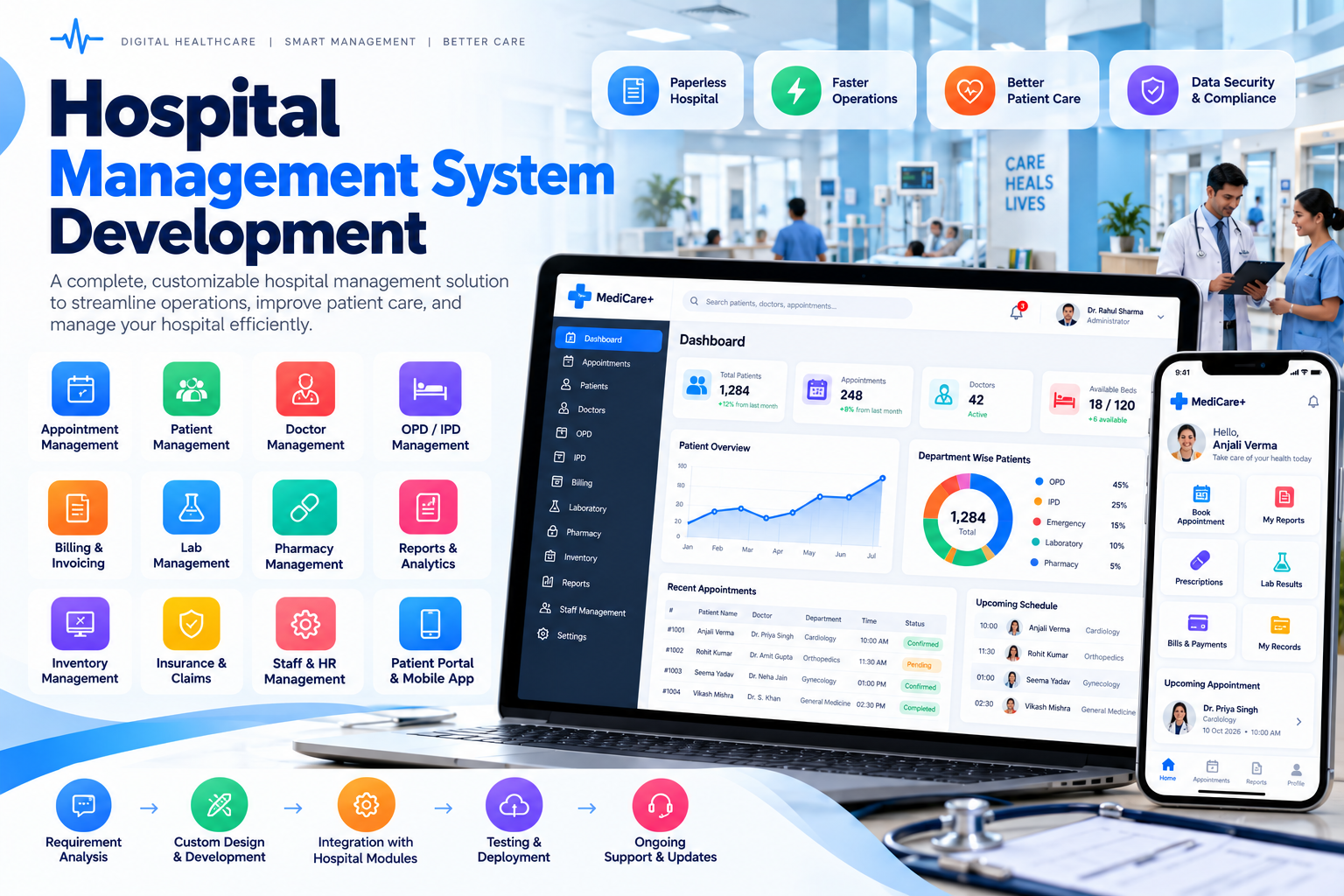
Start with the departments where paperwork hurts most, and add the rest as you go. Every module shares one patient record.
- OPD and Appointments. Online and walk-in booking, patient registration with a unique ID, token numbers on a display screen, and consultation fees collected at the desk. Patients get appointment reminders and reports on WhatsApp or SMS.
- IPD Admissions and Beds. A live view of every ward and bed, admissions and transfers in a few clicks, nursing notes, and room, doctor-visit and procedure charges added to the patient’s account automatically each day.
- Billing, Insurance and TPA Claims. Interim and final bills, advance deposits, package rates for cashless and scheme patients, split billing between patient and insurer, and claim documents generated straight from the patient record.
- Pharmacy and Store. Batch and expiry tracking, reorder alerts, purchase orders to suppliers, and medicines issued to ward patients posted to their bill instantly, so nothing given goes unbilled.
- Lab and Radiology. Test orders sent from the doctor’s screen, sample tracking with barcodes, results entered once and printed on your letterhead, and reports shared with the patient and the treating doctor.
- Patient Records for Doctors. Visit history, vitals, diagnoses, past prescriptions and reports on one screen. Doctors write prescriptions from templates in seconds, and discharge summaries are drafted from what is already on record.
How We Set It Up
Hospitals can’t pause for a software switch, so the rollout is planned to keep every counter running.
Hospital Walk-Through 3–5 days
We spend time at reception, the wards, the pharmacy, the lab and the billing counter to see how patients and paperwork move today. You receive a module plan and a fixed-price proposal.
Setup and Screen Design 1–2 weeks
Departments, doctors, fee rules, room categories, tariffs and report formats are mapped and shown to you as working screens for approval.
Development and Data Migration 5–8 weeks
We build the modules and move your existing patient, stock and tariff data from your current software or spreadsheets, checking for duplicates and gaps.
Training, Parallel Run and Go-Live 2–3 weeks
Department-wise training for every shift, a short period running old and new systems side by side, and our team on site or on call through the first days of full use.
Hospital software is tested at 11 p.m. in casualty, not in a demo. If the night-shift nurse can admit a patient without calling anyone for help, the system works. We build for that moment.
The Softxcite Team
Patient Data, Handled With Care
Medical records are among the most sensitive data any business holds. Every user gets access only to what their role needs: a receptionist sees appointments, not diagnoses, and the pharmacy sees prescriptions, not bills. Every view and change is logged, data is encrypted and backed up daily, and the system is designed with India’s Digital Personal Data Protection Act in mind. It also keeps the records and registers that accreditation bodies such as NABH typically ask to see, organised and easy to pull out.
Frequently Asked Questions
Is this only for large hospitals, or can a clinic or nursing home use it?
Both. A single-doctor clinic might start with appointments, prescriptions and billing. A 100-bed hospital will need IPD, pharmacy, lab and insurance modules as well. Because the system is custom, you pay for the modules you use and add more as you grow.
Can it handle insurance, TPA and government scheme claims?
Yes. Bills can be split between the patient and the insurer, package rates can be set for cashless and scheme patients, and pre-authorisation and claim documents are generated from the patient record, so your billing team is not re-typing case details.
Can the system connect with ABDM and ABHA health IDs?
We can build the system to work with the Ayushman Bharat Digital Mission, including linking records to a patient’s ABHA number. The exact integration depends on ABDM’s current requirements and registration process, which we review with you during planning.
What happens if the internet goes down?
For hospitals where connectivity is unreliable, the system can run on a server inside the hospital with cloud backup, so OPD, billing and pharmacy keep working during an outage and sync once the connection returns.
Can we move our old patient records into the new system?
Yes. We import patient lists, past bills, pharmacy stock and doctor details from your current software or Excel sheets, check them for duplicates, and run the old and new systems side by side for a short period before switching over fully.